
Tag Removed Trigger
The Tag Removed from Subscriber trigger fires when a tag is removed from a subscriber.
When It Fires
- An admin manually removes a tag from a subscriber
- An automation removes a tag via the “Remove Tag” action
- An API call removes a tag
Configuration Options
| Option | Description |
|---|---|
| Tag | Select a specific tag, or leave as “Any tag” |
Available Data
| Variable | Description |
|---|---|
{{email}} | Subscriber’s email |
{{first_name}} | First name |
{{last_name}} | Last name |
{{tag_id}} | The ID of the tag that was removed |
{{tag_name}} | The name of the tag |
Common Use Cases
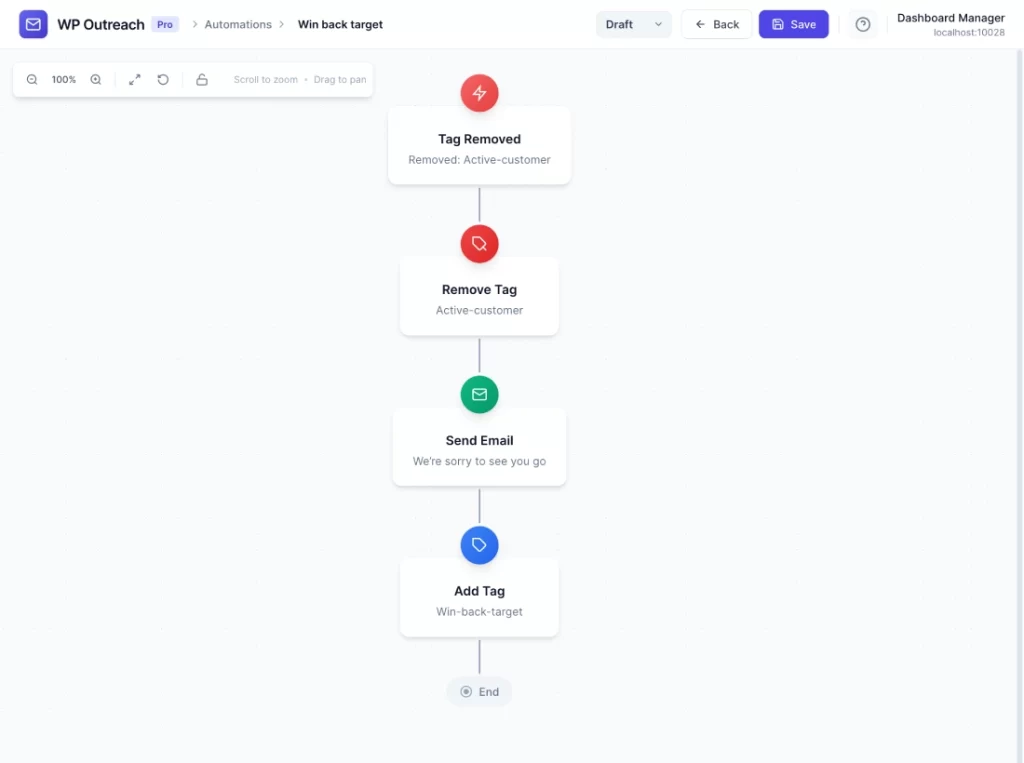
Customer Status Change
- Tag Removed: “active-customer”
- Send Email: “We’re sorry to see you go”
- Add Tag: “win-back-target”
Notify Admin of Status Change
- Tag Removed: “VIP”
- Webhook Call: Alert admin in Slack
Pro Tips
- Use this trigger to start win-back campaigns when engagement drops
- Clean up related tags when a status tag is removed
Last updated: January 14, 2026