
Post Updated Trigger
The Post Updated trigger fires when an EXISTING published post is updated.
When It Fires
- An already-published post is saved with changes
- Post content, title, or other fields are modified
Note: This trigger only fires for posts that are already published. Initial publication uses the “Post Published” trigger.
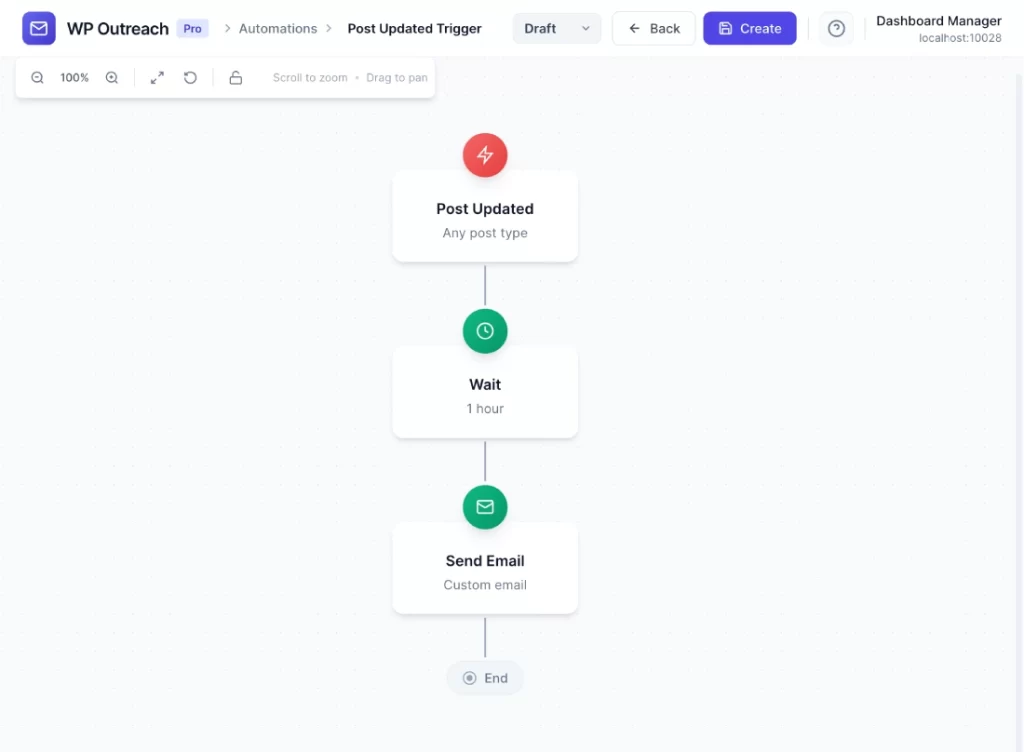
Configuration Options
| Option | Description |
|---|---|
| Post Type | Filter by post type. Leave as “Any post type” to trigger for all. |
Available Data
| Variable | Description |
|---|---|
{{post_id}} | The updated post ID |
{{post_type}} | Post type |
{{post_title}} | Post title (may have changed) |
{{post_url}} | URL to the post |
{{post_excerpt}} | Post excerpt |
{{post_author}} | Author display name |
{{post_modified}} | Last modified date |
{{featured_image}} | Featured image URL |
Common Use Cases
Notify Post Subscribers
- Post Updated: Post Type = “Post”
- Send Email to post subscribers: “{{post_title}} has been updated”
Documentation Update Alerts
- Post Updated: Post Type = “wpo_doc”
- Send Email to “Documentation Subscribers”: “Documentation updated”
Pro Tips
- Consider using a Wait step to avoid spamming subscribers if multiple edits are made quickly
- Works great for documentation sites where users want to be notified of changes
- Combine with the Post Subscription feature for opt-in update notifications
Last updated: January 14, 2026