
Email Not Opened Trigger
The Email Not Opened trigger fires when a subscriber has not opened an email after a specified number of days. This is perfect for re-engagement campaigns and automated follow-ups to non-responsive subscribers.
When It Fires
This trigger activates when:
- The specified number of days have passed since the email was sent
- The subscriber has not opened the email
- The system runs its scheduled check (typically daily)
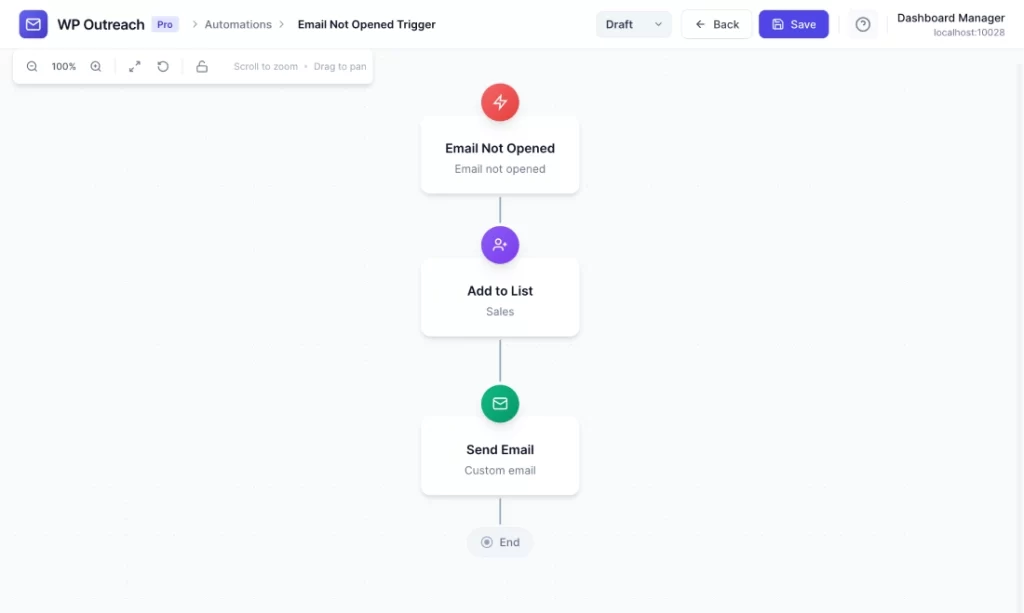
Configuration Options
Campaign (Required)
Select which campaign to monitor for unopened emails.
Days Without Opening (Required)
Specify how many days to wait before triggering:
- 1-3 days – Quick follow-up for time-sensitive content
- 5-7 days – Standard re-engagement window
- 14+ days – Long-term non-engagement tracking
Available Data
When this trigger fires, the following merge tags are available:
| Merge Tag | Description |
|---|---|
{{subscriber.id}} | Subscriber ID |
{{subscriber.email}} | Email address |
{{subscriber.first_name}} | First name |
{{subscriber.last_name}} | Last name |
{{campaign.id}} | Original campaign ID |
{{campaign.name}} | Original campaign name |
{{campaign.subject}} | Original email subject |
{{sent_at}} | When the email was sent |
{{days_elapsed}} | Days since sending |
Common Use Cases
- Resend with New Subject – Automatically resend important emails with a different subject line to non-openers
- Alternative Channel – If email is not working, trigger an SMS or push notification
- List Hygiene – After multiple non-opens, add a “disengaged” tag for cleanup
- Win-Back Campaigns – Start a re-engagement sequence for inactive subscribers
- A/B Testing Follow-up – Send version B of content to those who did not engage with version A
Pro Tips
- Remember that email opens are not always tracked accurately – some subscribers may have read the email but blocked tracking
- Use a reasonable wait time (3-7 days) before assuming non-engagement
- Consider subscriber timezone when setting up time-sensitive follow-ups
- Combine with engagement history conditions to avoid annoying subscribers who are generally active
- Limit resends to important campaigns only – too many follow-ups can increase unsubscribes
Last updated: January 14, 2026