
Amazon SES Setup
Configure Amazon Simple Email Service (SES) for reliable, high-volume email delivery with detailed setup instructions.
Amazon Simple Email Service (SES) is a scalable, cost-effective email delivery service. This guide walks you through setting up SES with WP Outreach for reliable, high-volume email sending.
Why Use Amazon SES?
| Benefit | Description |
|---|---|
| High Deliverability | Amazon infrastructure with excellent IP reputation |
| Scalability | Send millions of emails without infrastructure concerns |
| Cost Effective | $0.10 per 1,000 emails (with free tier available) |
| Reliability | 99.9% uptime SLA |
| Analytics | Bounce, complaint, and delivery tracking |
Prerequisites
- An AWS account (Sign up here)
- A verified domain or email address
- WP Outreach installed and activated
Step 1: Create AWS IAM Credentials
Create dedicated credentials for WP Outreach:
- Log in to the AWS IAM Console
- Click Users → Add users
- Enter a username (e.g., “wp-outreach-ses”)
- Select Access key – Programmatic access
- Click Next: Permissions
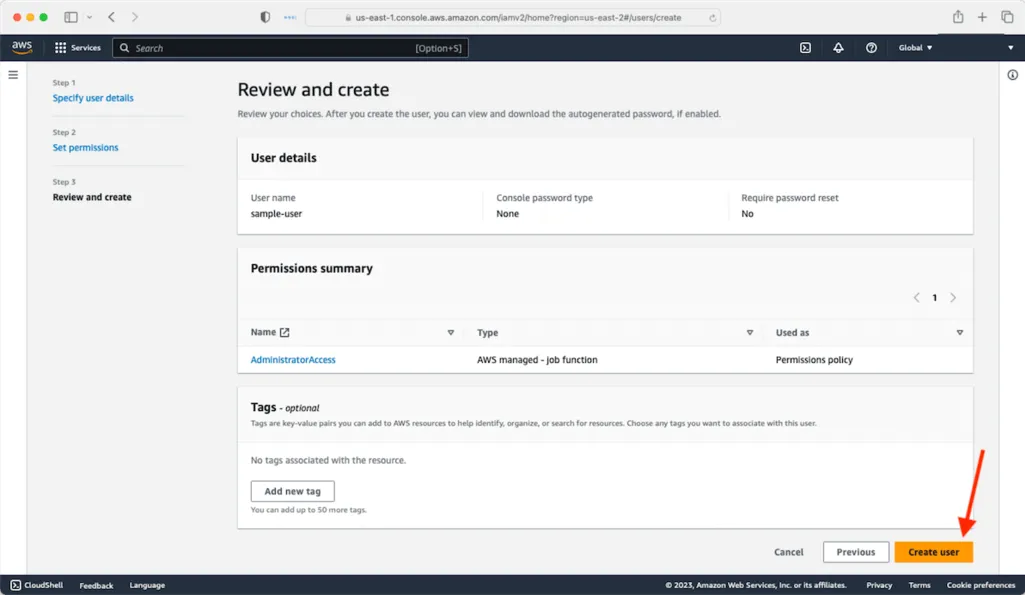
Attach SES Policy
- Click Attach policies directly
- Search for “AmazonSESFullAccess”
- Check the box next to it
- Click Next → Create user
Save Your Credentials
- On the success page, click Download .csv
- Save the Access Key ID and Secret Access Key securely
- Important: You will not be able to see the secret key again!
Security Warning: Never share your AWS credentials. Store them securely and consider using environment variables instead of storing in the database.
Step 2: Verify Your Domain
Amazon SES requires you to verify ownership of your sending domain:
Option A: Verify in AWS Console
- Go to Amazon SES Console
- Select your region (e.g., us-east-1)
- Click Verified identities → Create identity
- Choose Domain
- Enter your domain (e.g., yoursite.com)
- Click Create identity
Option B: Verify in WP Outreach
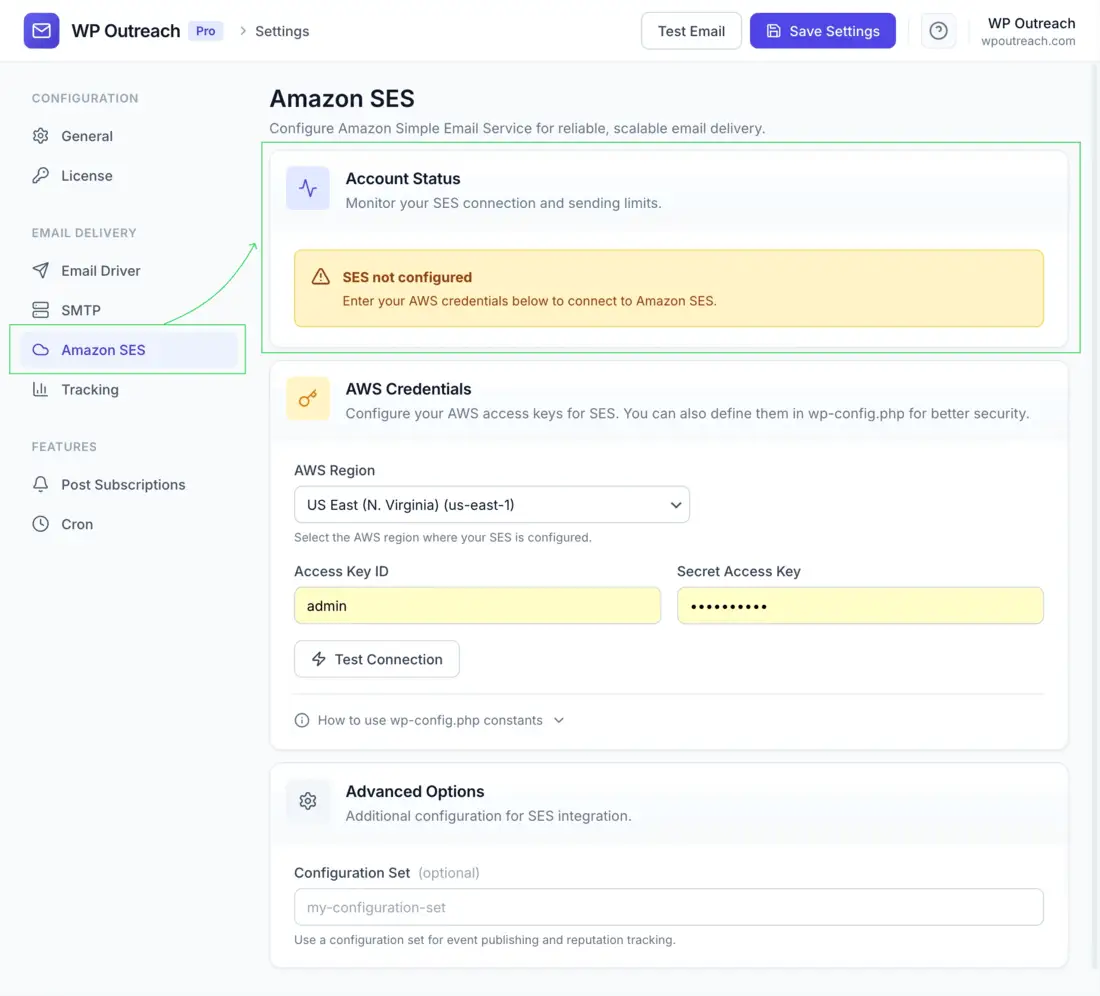
- Go to WP Outreach → Settings → Amazon SES
- Enter your credentials (see Step 3)
- Click Verify Domain
- Enter your domain
- Follow the DNS instructions provided
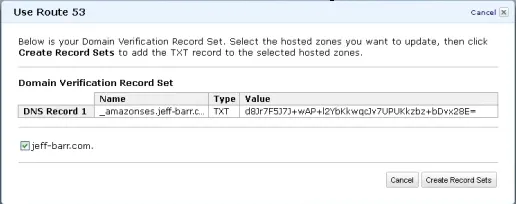
Add DNS Records
Add the provided DNS records to your domain:
| Record Type | Name | Purpose |
|---|---|---|
| TXT | _amazonses.yourdomain.com | Domain verification |
| CNAME | (provided by AWS) | DKIM signing (3 records) |
| MX | (optional) | Bounce handling |
Verification typically takes 24-72 hours.
Step 3: Configure WP Outreach
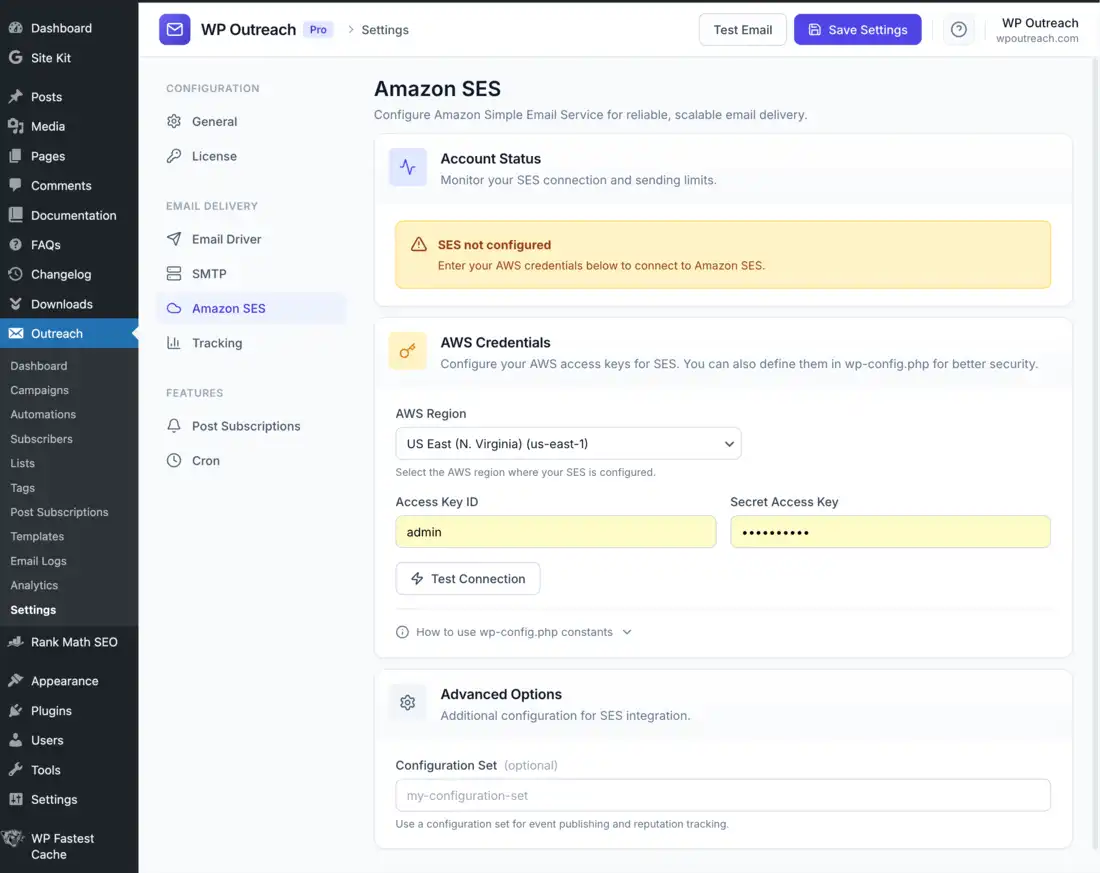
- Go to WP Outreach → Settings → Amazon SES
- Enter your credentials:
- Access Key ID: Your IAM access key
- Secret Access Key: Your IAM secret key
- Region: Select your SES region
- Click Save Settings
- Click Test Connection to verify
Using Environment Variables (Recommended)
For better security, store credentials in wp-config.php:
// Add to wp-config.php
define('WP_OUTREACH_SES_ACCESS_KEY', 'AKIA...your-key...');
define('WP_OUTREACH_SES_SECRET_KEY', 'wJalr...your-secret...');
define('WP_OUTREACH_SES_REGION', 'us-east-1');
When these constants are defined, WP Outreach uses them automatically and hides the credential fields in settings.
Step 4: Enable SES as Mailer
- Go to WP Outreach → Settings → Mailer
- Select Amazon SES
- Click Save Settings
Step 5: Request Production Access
New SES accounts start in “sandbox mode” with these limitations:
- Can only send to verified email addresses
- 200 emails per day limit
- 1 email per second rate limit
To send to any address, request production access:
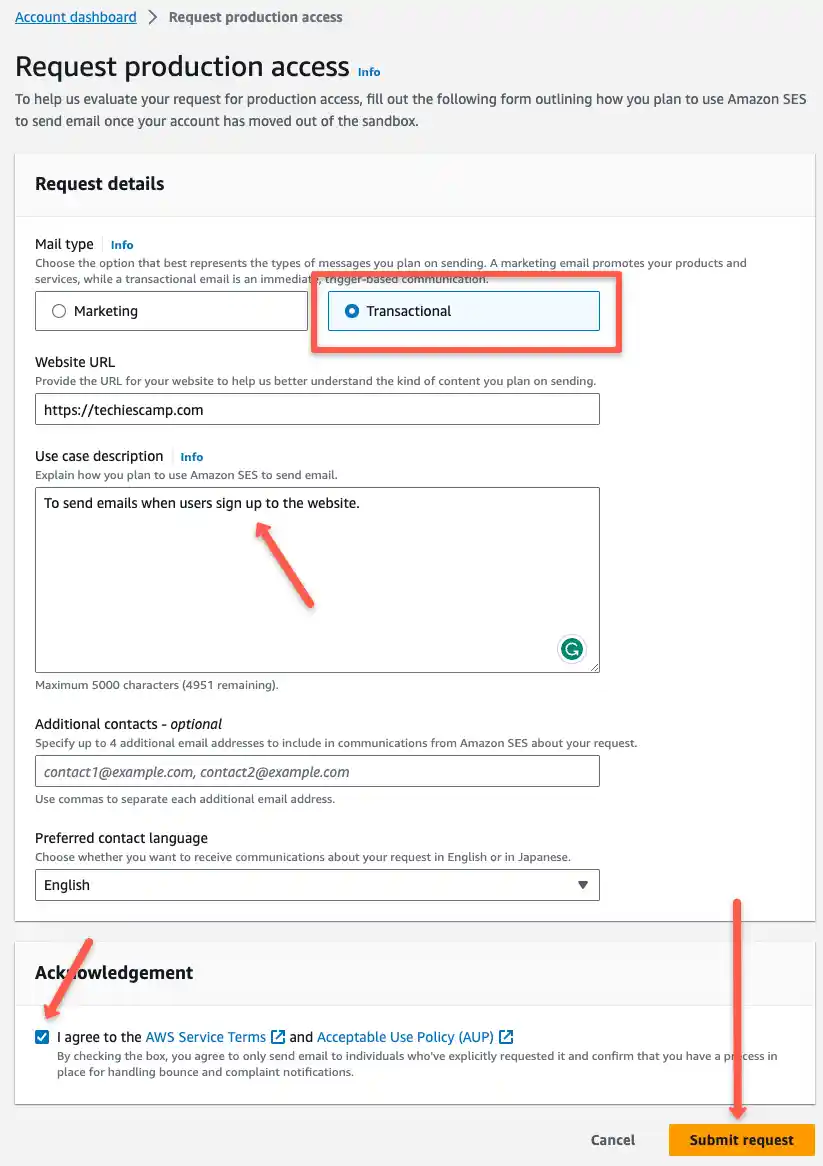
- In AWS SES Console, click Account dashboard
- Click Request production access
- Fill out the form:
- Mail type: Transactional or Marketing
- Website URL
- Use case description
- How you handle bounces and complaints
- Submit and wait for approval (typically 24-48 hours)
SES Dashboard in WP Outreach
After configuration, the SES settings page shows:
Account Status
- Mode: Sandbox or Production
- Sending Enabled: Yes/No
- Daily Quota: Emails allowed per day
- Sent Today: Current usage
- Send Rate: Emails per second limit
Verified Identities
List of verified domains and email addresses with status indicators.
Statistics
- Delivery rate
- Bounce rate
- Complaint rate
- Send volume over time
Available Regions
Amazon SES is available in these regions:
| Region | Code | Best For |
|---|---|---|
| US East (N. Virginia) | us-east-1 | North America |
| US West (Oregon) | us-west-2 | US West Coast |
| EU (Ireland) | eu-west-1 | Europe |
| EU (Frankfurt) | eu-central-1 | GDPR-sensitive data |
| Asia Pacific (Singapore) | ap-southeast-1 | Asia |
| Asia Pacific (Sydney) | ap-southeast-2 | Australia |
| Asia Pacific (Tokyo) | ap-northeast-1 | Japan |
Tip: Choose a region close to your audience for lower latency. If GDPR compliance is important, use EU regions.
Troubleshooting
Connection Failed
- Verify credentials are correct
- Check IAM user has SES permissions
- Ensure selected region matches your SES setup
- Check server can make outbound HTTPS requests
Domain Not Verified
- Confirm DNS records are correct
- Wait up to 72 hours for propagation
- Check for typos in DNS values
- Verify you are checking the correct region
Sandbox Mode Errors
- In sandbox, you can only send to verified addresses
- Request production access for unrestricted sending
- Temporarily verify test recipient addresses
High Bounce Rate
- Clean your subscriber list
- Use double opt-in
- Remove inactive subscribers
- AWS may suspend accounts with >5% bounce rate
Cost Estimation
| Monthly Emails | Approximate Cost |
|---|---|
| 1,000 | $0.10 |
| 10,000 | $1.00 |
| 100,000 | $10.00 |
| 1,000,000 | $100.00 |
AWS offers 62,000 free emails per month when sending from an EC2-hosted application.
Last updated: January 4, 2026